Download
Only BYD Owners LAB regular members can download (checked by cafe nickname). Test builds also need a download key.
Latest release
Once installed, the launcher checks for new releases on its own and offers them to you. You won't need to come back here.
The debug build is for testing. Use it only when you're helping chase a problem that's being fixed. It sends logs to a server and can contain half-finished work. Automatic updates follow the stable line only. It is signed with the same key as the release, so the two install over each other.
No key? Ask through the contact on the “Report a bug” tab. The release build above needs none — take it as it is.
ATTO 3 · Dolphin · Seal
The first install is done this way — see the “Install” tab above. After that the launcher checks for new releases on its own.
The instrument cluster works on the Sealion 7 and Seal. On the ATTO 3 and Dolphin the launcher stays on the centre screen; the screen beyond the steering wheel is left as the car made it.
The debug build is for testing. Use it only when you're helping chase a problem that's being fixed. It can contain half-finished work. It is signed with the same key as the release, so the two install over each other.
No key? Ask through the contact on the “Report a bug” tab. The release above needs none.
Standalone apps
These run on their own, separately from the launcher. If you use the launcher you mostly won't need them — they're for using that one piece without it.
Switches wireless ADB back on at every start. It is built into the launcher, so you don't need this one if you use the launcher.
From 3.0 it also carries remote adb (Tailscale) — the same address whatever network the car is on. Fine to use alongside the launcher.
Get AdbKick Get the stable release ManualPuts the Beetle gauges on the instrument cluster without taking over the home screen. Launching it also opens the stock split screen with the two apps you picked.
Lets apps use a USB game pad in the car and shows every button and stick live. Plug the pad into the USB-A port.
Get Beetle PadInstalls apk, xapk and apkm files from the Download folder onto the car.
Get APK InstallerPick and play arcade (MAME) and PSP games in the car. With Beetle Pad the game pad works right away. Games only start in P (park).
Open source, based on MAME4droid (GPL-2.0). Source code
Get Beetle Game RoomAutoLaunch
At ignition it checked wireless ADB, restored Wi-Fi, launched your apps, then closed.
Beetle OTT
A browser for watching various OTT services in the car.
A browser for watching various OTT services in the car.
Anyone can download it. Once installed, the app checks for new versions by itself.
It is a big file (about 225 MB) — download it on Wi-Fi.
Get the APKBeetle-Net
A web browser for the car.
Anyone can download it. Once installed, the app checks for new versions by itself.
Nothing published yet. Coming shortly.
Get the APKBeetle View
A four-camera dashcam and parking watch app.
Putting it on the car
You can do this from a computer, or from a phone alone. Once.
Easier from a phone
Put your phone on the same Wi-Fi as the car, connect over wireless ADB with one of these, and install the APK straight from the phone. No computer, no cable.
Bugjaeger is Android-only. On iPhone, use atvTools.
With APK Installer — after that, all inside the car
Put APK Installer on the car once, using a phone app above or a computer below. After that you install apk files right in the car, no ADB needed.
-
Download the apk into the Download folder
Open this site in Beetle-Net on the car and download the apk — it lands in the Download folder. xapk and apkm bundles work too.
-
Open APK Installer and pick the file
The files in the Download folder are listed. Pick one and the right side shows the installed and the new version — press the button below it («Install» or «Update»).
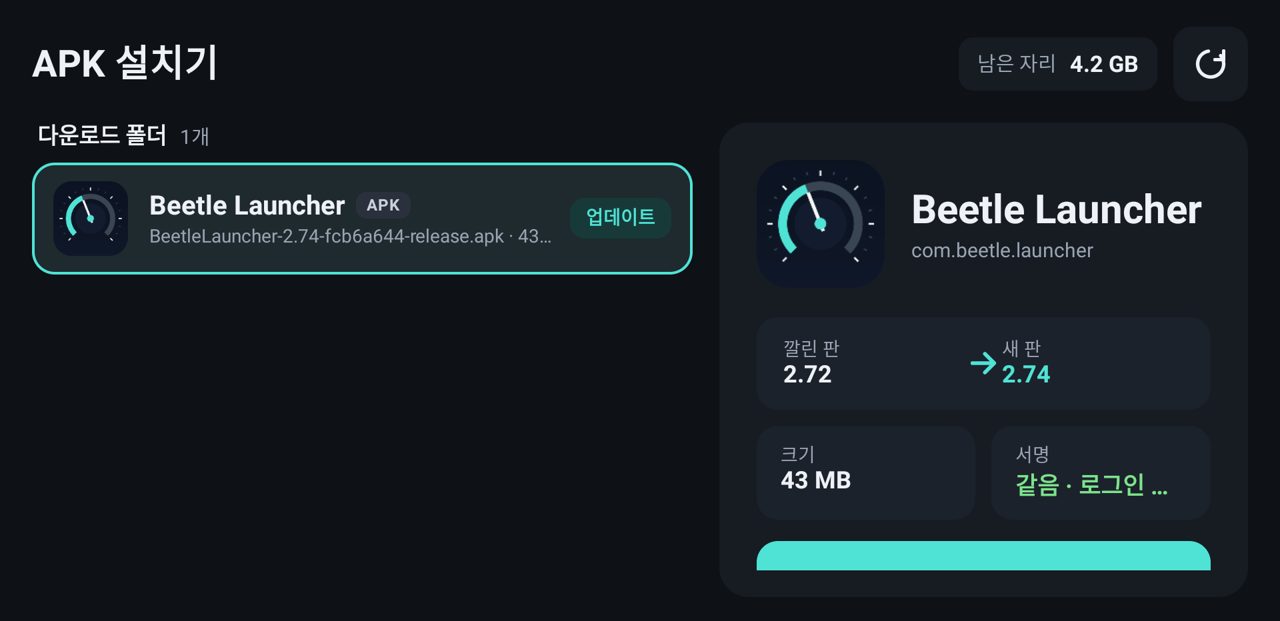
The apk in the Download folder — installed 2.72 → new 2.74, «Update» -
Tap «Install» in the system window
Tap «Install» in the window the car shows. When it's done, «Open» starts the app and «Delete original» clears the downloaded file.
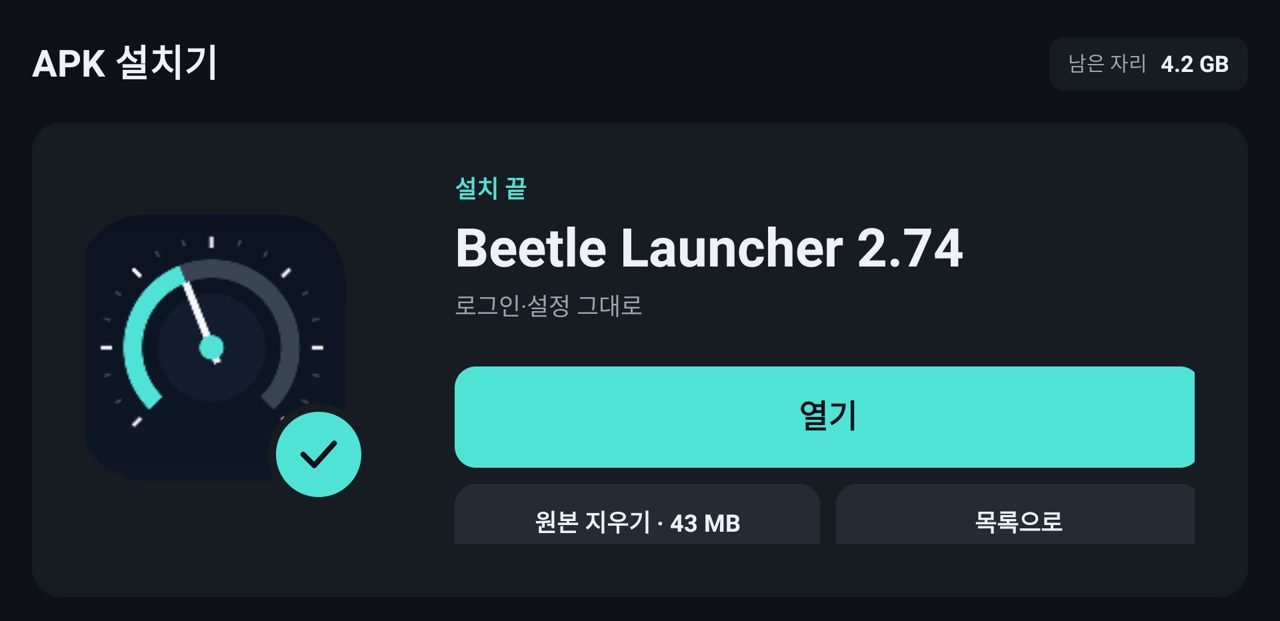
Done — sign-ins and settings are kept
If the same app is installed with a different signature, it asks whether to remove it first. Removing it clears that app's sign-ins and settings.
From a computer
-
Connect over wireless ADB
Turn on wireless ADB from the head unit's engineer menu, then connect from a computer on the same network.
adb connect <car-ip>:5555
-
Install it
adb install -r BeetleLauncher-1.48-4117dca-release.apk
On the ATTO 3 it is this file:
-
Grant one permission
Without it the launcher cannot switch wireless ADB back on for you after the next start.
adb shell pm grant com.beetle.launcher \
  android.permission.WRITE_SECURE_SETTINGS
AdbKick — the piece that switches wireless ADB back on — is built into the launcher. You don't need to install it separately, and if you still have the standalone one, the launcher does not call it.
Before you install
- This is unofficial. It is not affiliated with, endorsed by, or connected to the vehicle manufacturer in any way.
- It does not modify vehicle firmware. It replaces the home screen, and it drives the car through the same published SDK the factory app uses.
- Install at your own risk. No warranty of any kind is given. Do not operate it while driving.
- Using it alongside other apps cannot be checked. Apps that handle the same things — home screen, cluster, wireless ADB, auto-start — can conflict when installed together, and those conflicts are something even the developer cannot foresee or reproduce. Where you can, use just one such app.
- Supported models: Sealion 7 · ATTO 3 · Dolphin · Seal Other models are untested.